Eltex
Service router management interfaces.
Telecom
B2B
Web
Company
Eltex
Role
Product Designer
A service router is a product for configuring, monitoring, and managing network equipment.
The main users of the system were network engineers.
My task was to transform complex technical configurations and engineering workflows into clear graphical interfaces.
Main challenge of the project
The project required working with a complex domain: a large number of parameters, interconnected settings, and high information density. One of the key tasks was to preserve the familiar logic for network engineers while presenting it in a convenient and understandable graphical interface.
Constraints
The project started before I joined. I continued product development by designing new sections and scenarios from scratch while adhering to the established interface principles and existing system constraints.
Corporate design system
Interfaces were built on the corporate design system Protocol UI. The system is based on design tokens and includes a component library, storybook, and guidelines for interface pattern usage.
Physical interface management
Task: provide engineers with quick access to configuration, monitoring, and diagnostics of interfaces.
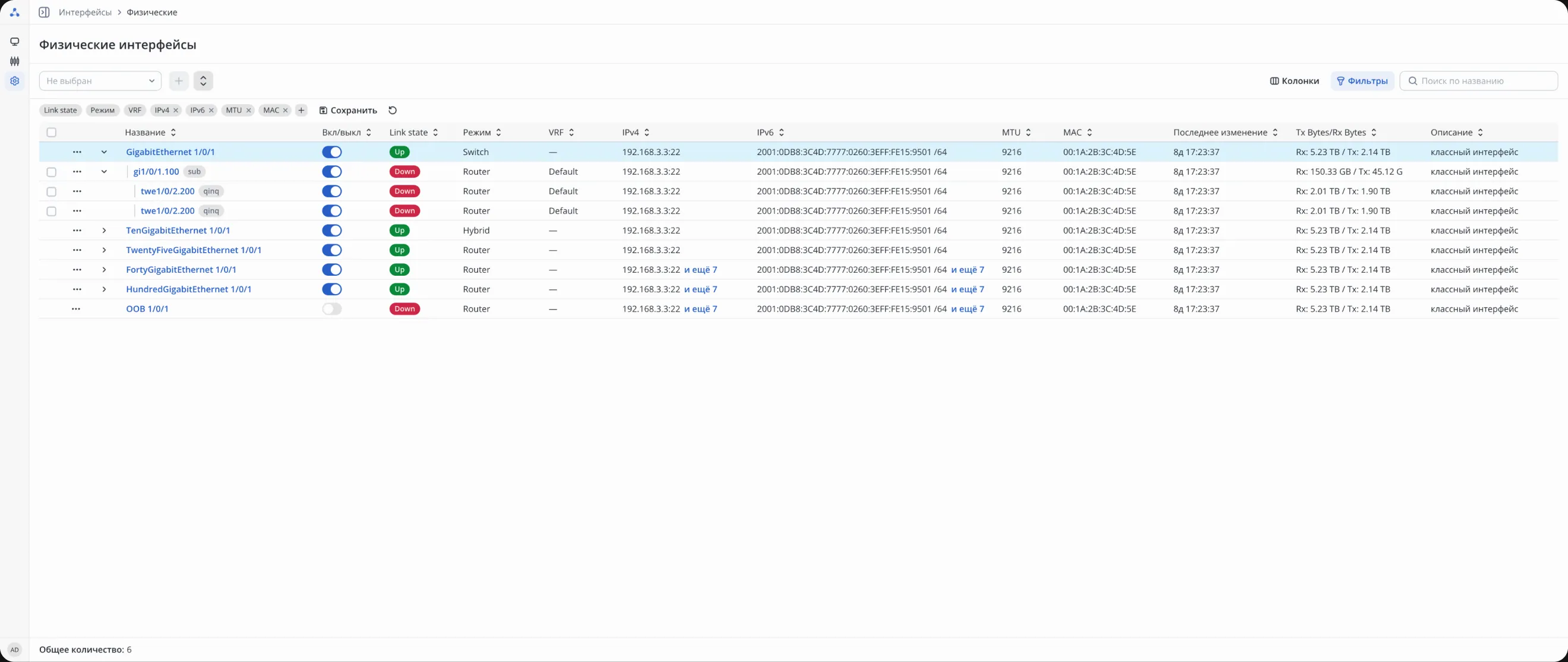
Interface list
Engineers need to simultaneously monitor many physical and nested interfaces and quickly identify problem states. Therefore, the section is based on a table with filtering, visual statuses, and support for interface hierarchy.
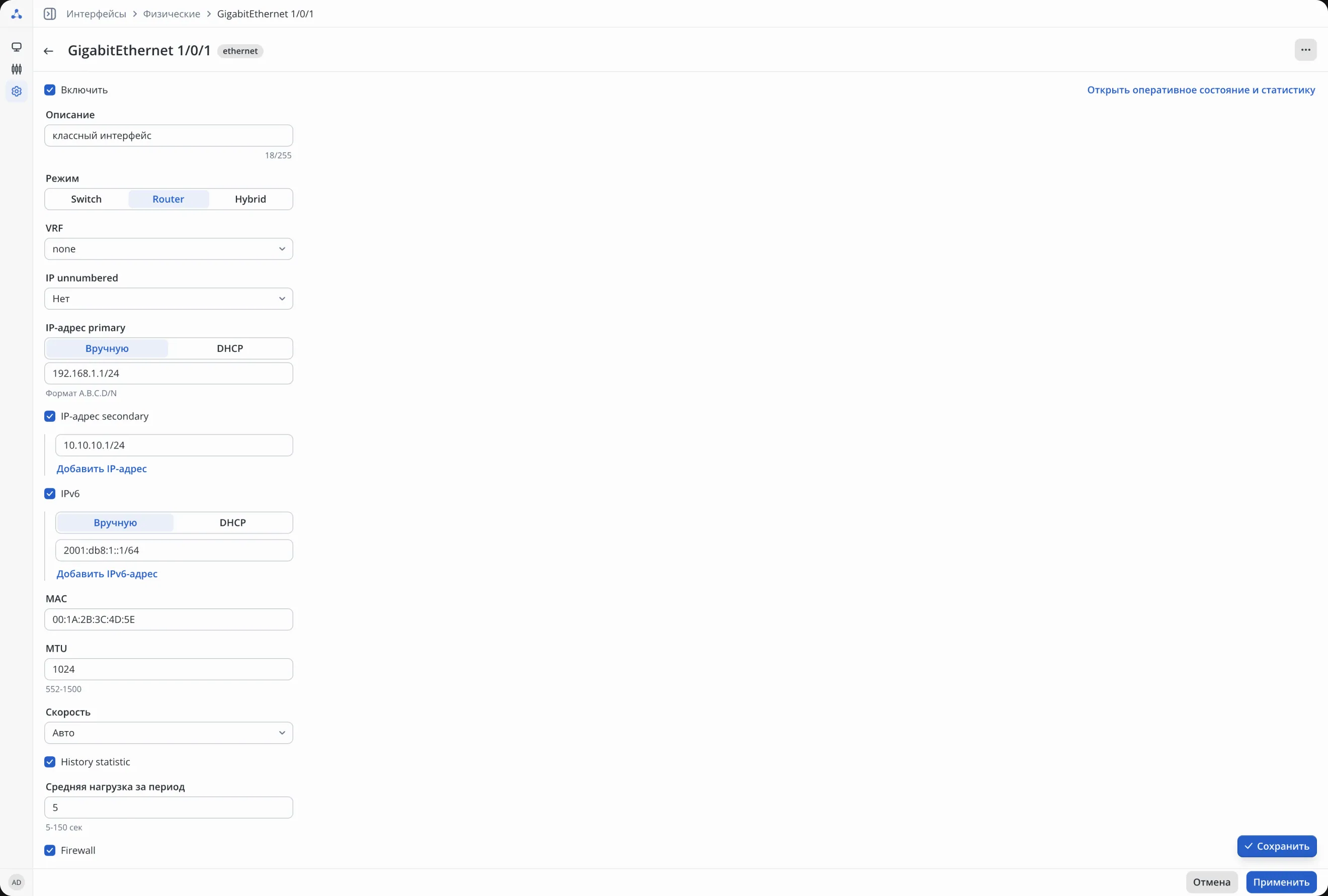
Interface configuration
Interface configuration includes many related parameters. Instead of spreading settings across multiple screens, I combined them into a single form so engineers can configure the interface step-by-step without unnecessary navigation.
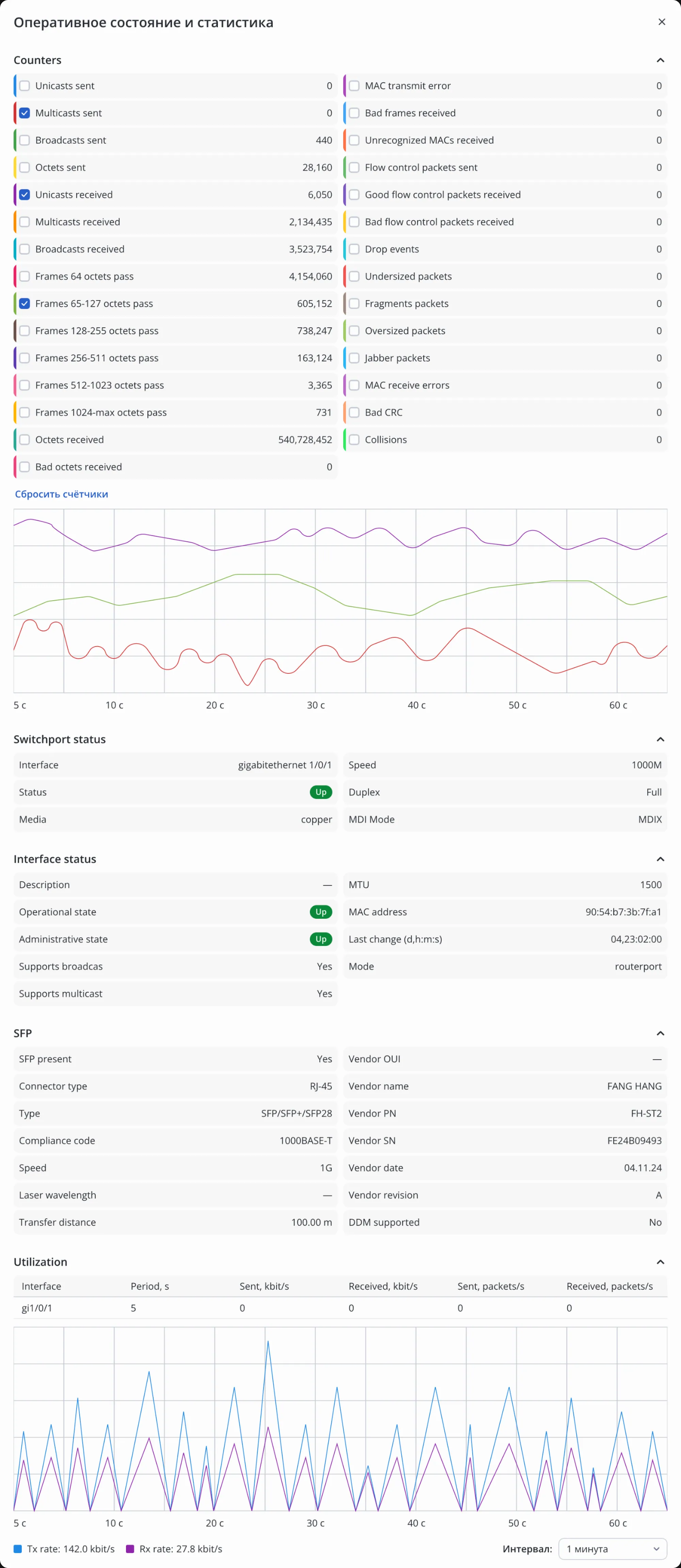
Monitoring and diagnostics
For diagnostics, engineers need to see interface status, technical metrics, and load dynamics in one place. So I combined operational data, statuses, and charts on a single screen to allow main checks without switching to CLI.
User management
Task: manage device access and configure authentication methods.
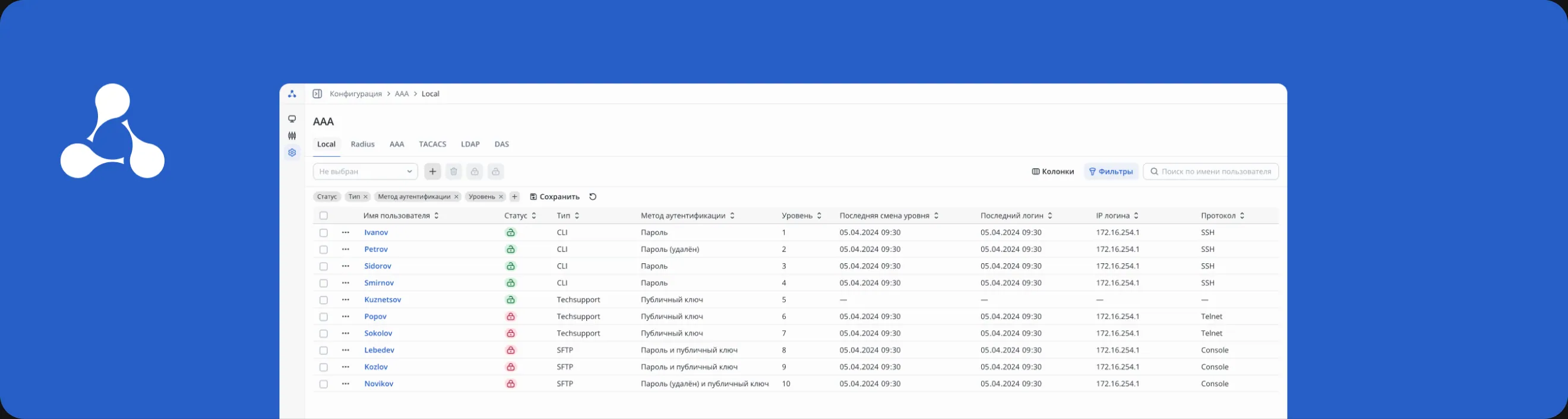
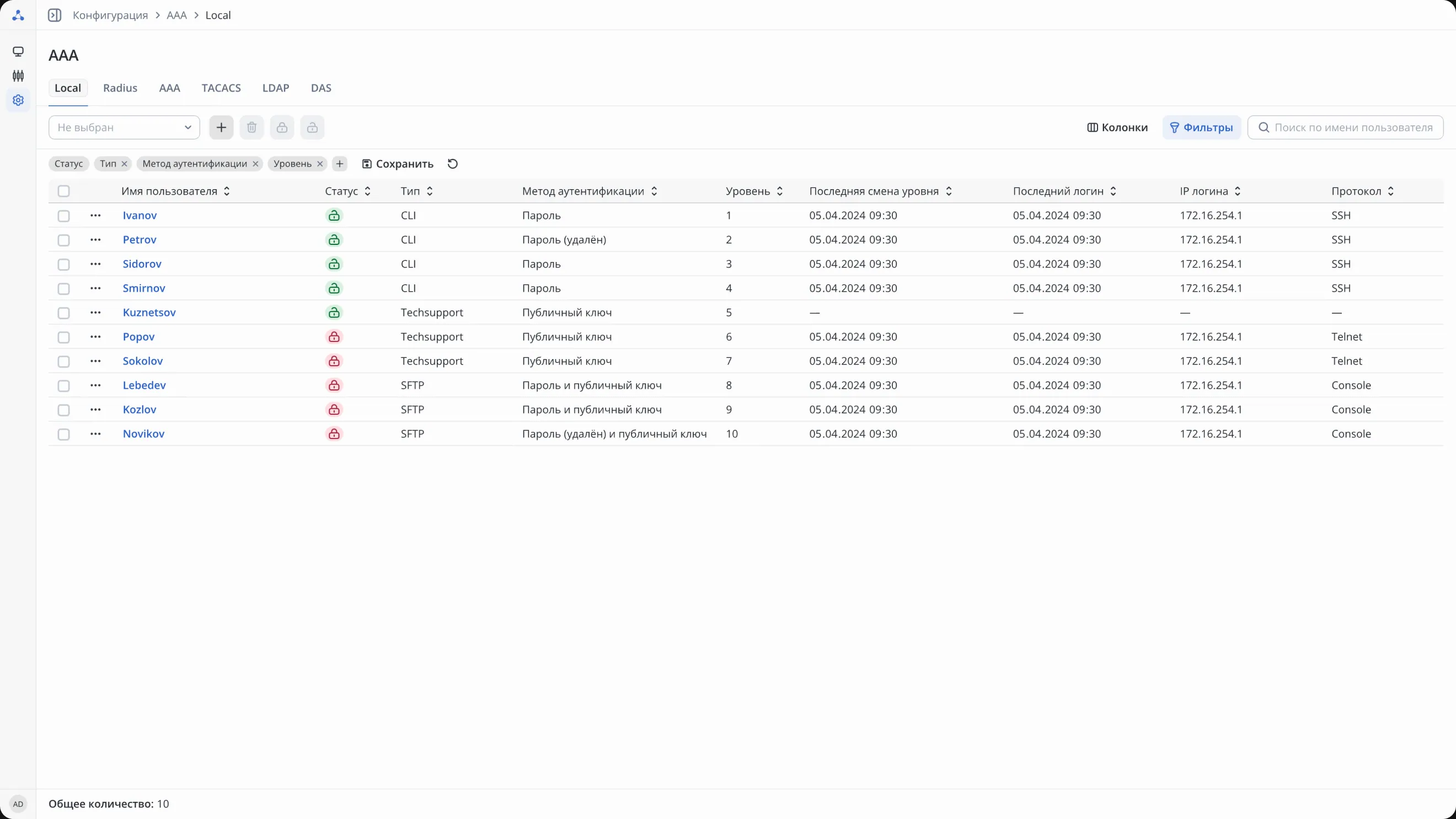
User list
To manage access, engineers need to quickly see account status, access level, and authentication method. Therefore, key parameters and statuses were placed directly in the table.
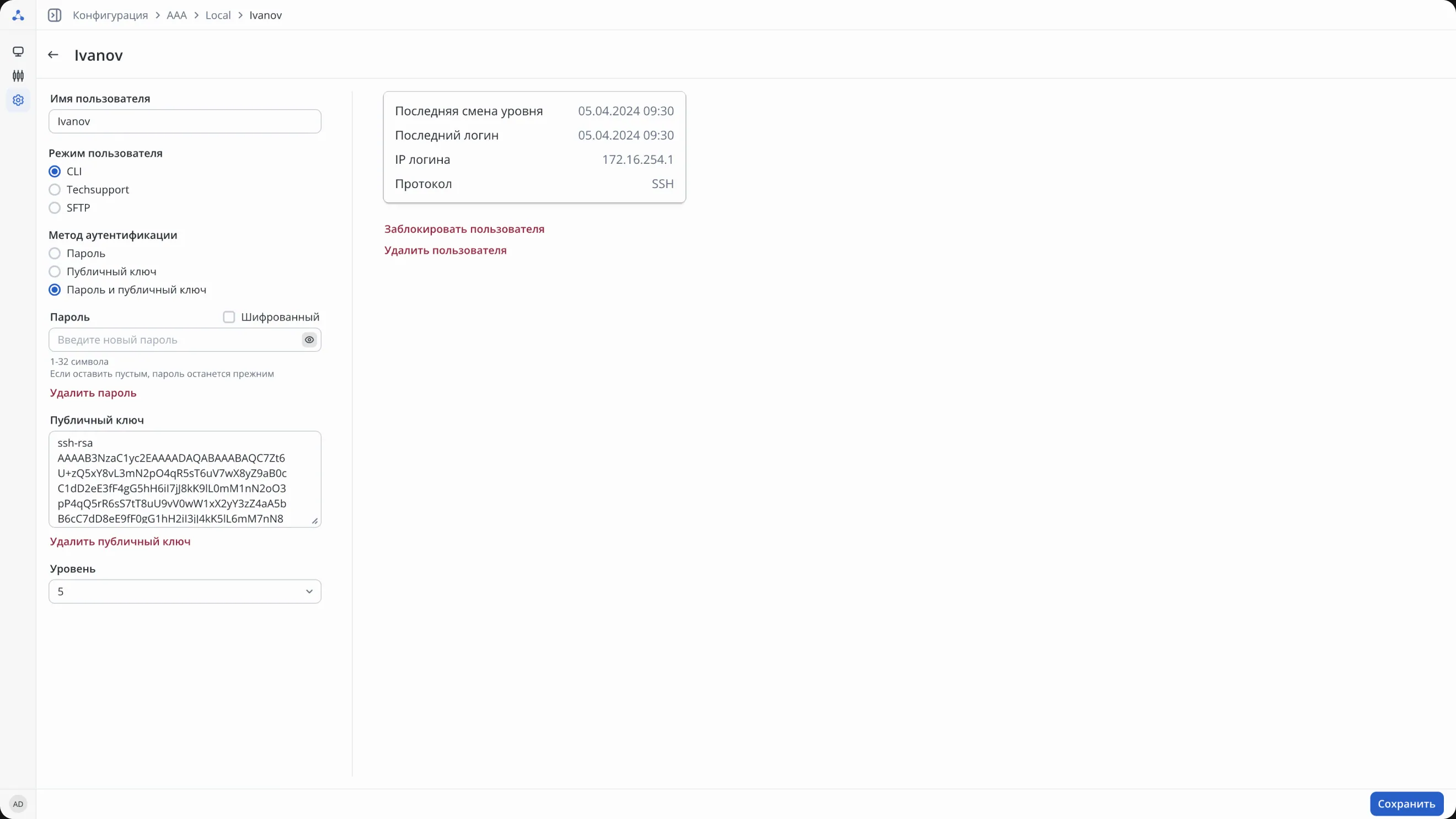
User card
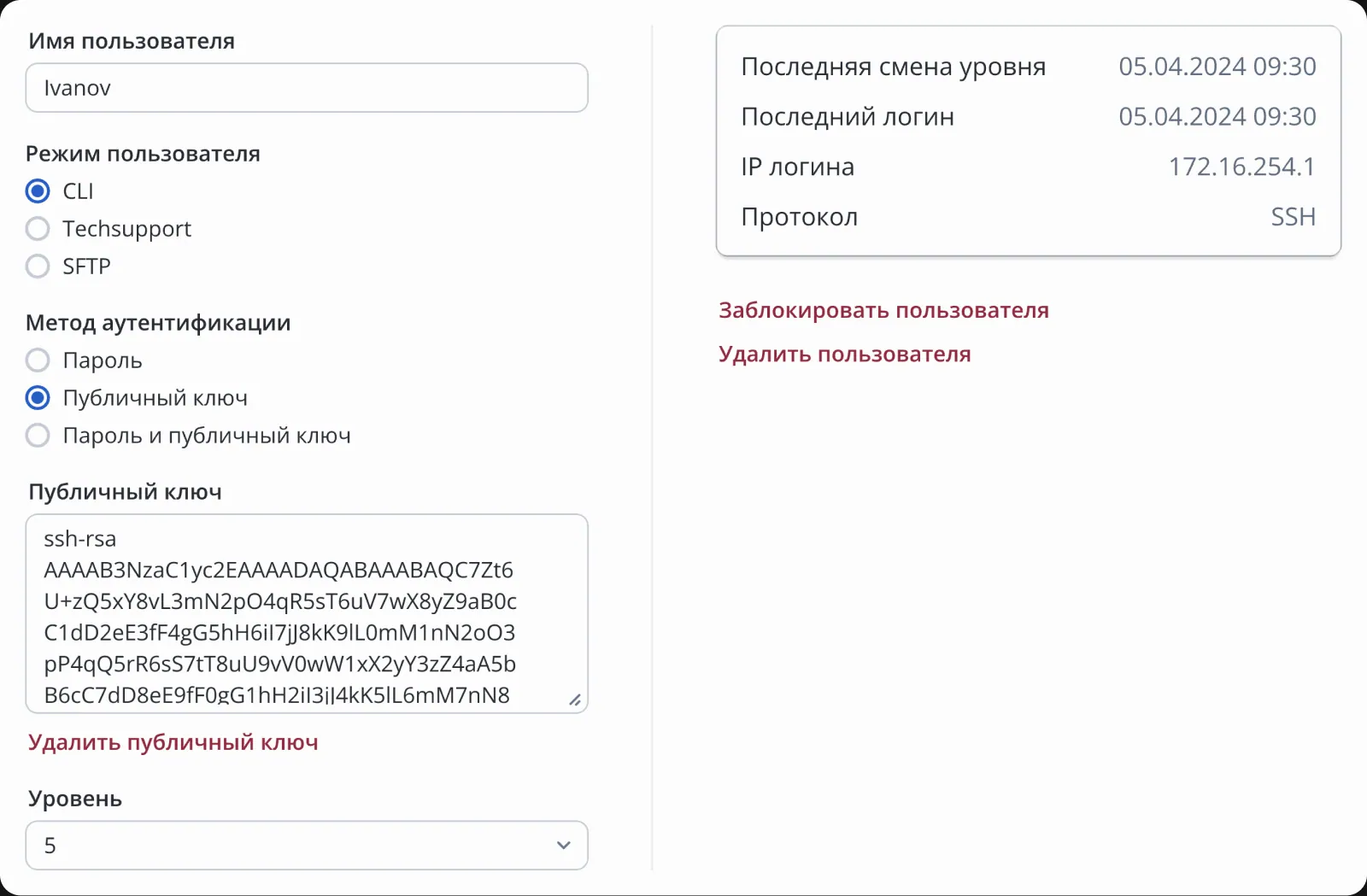
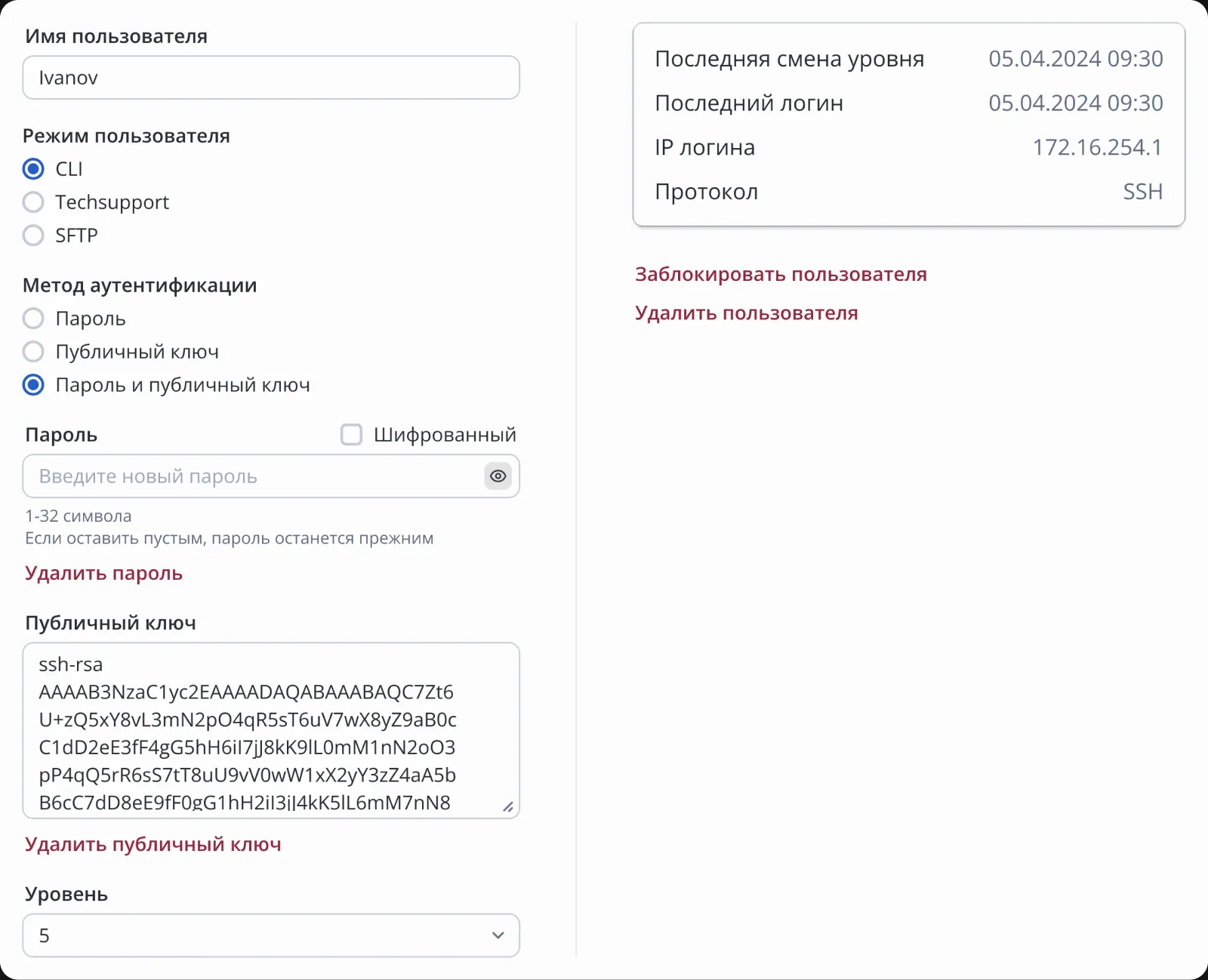
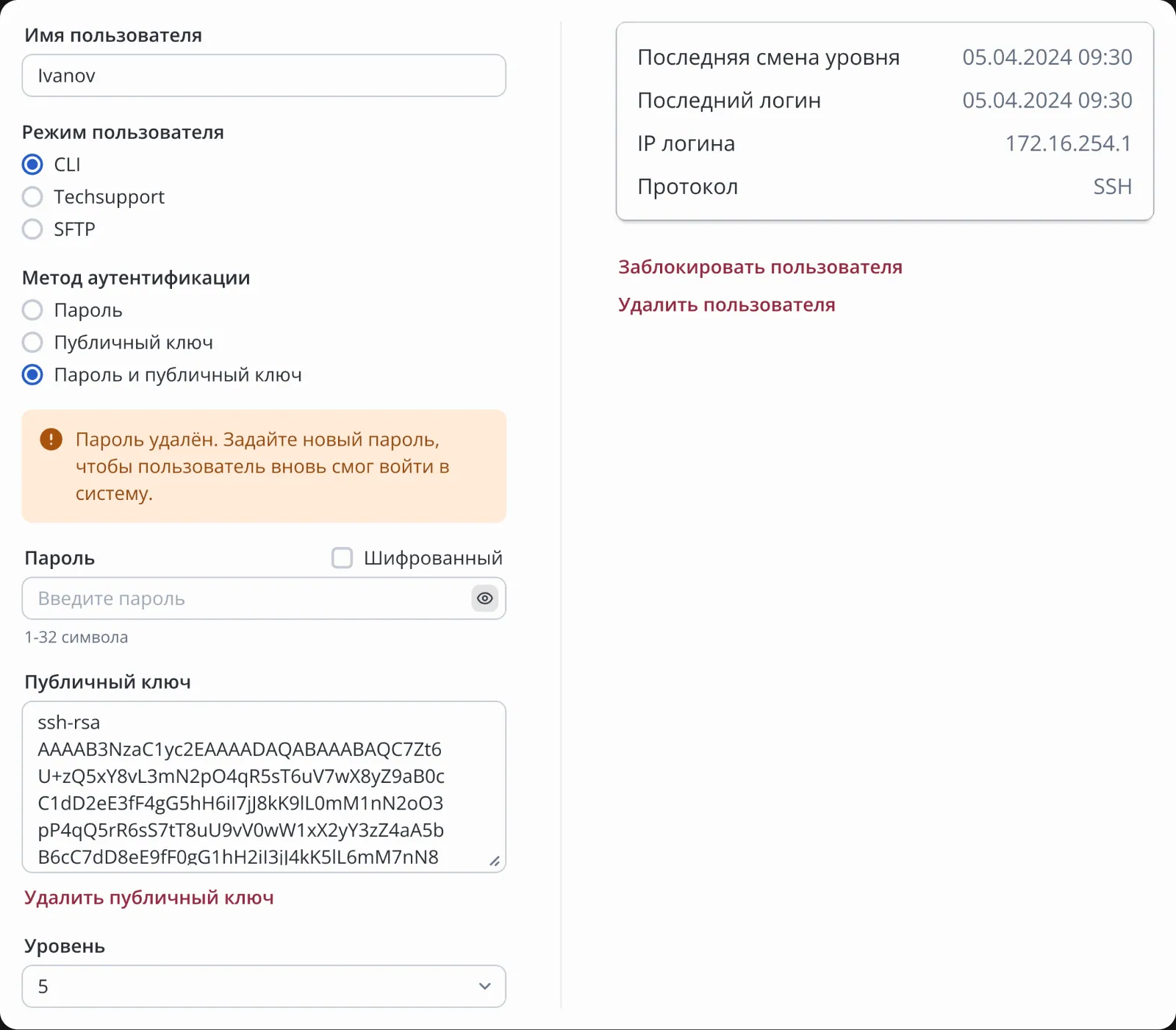
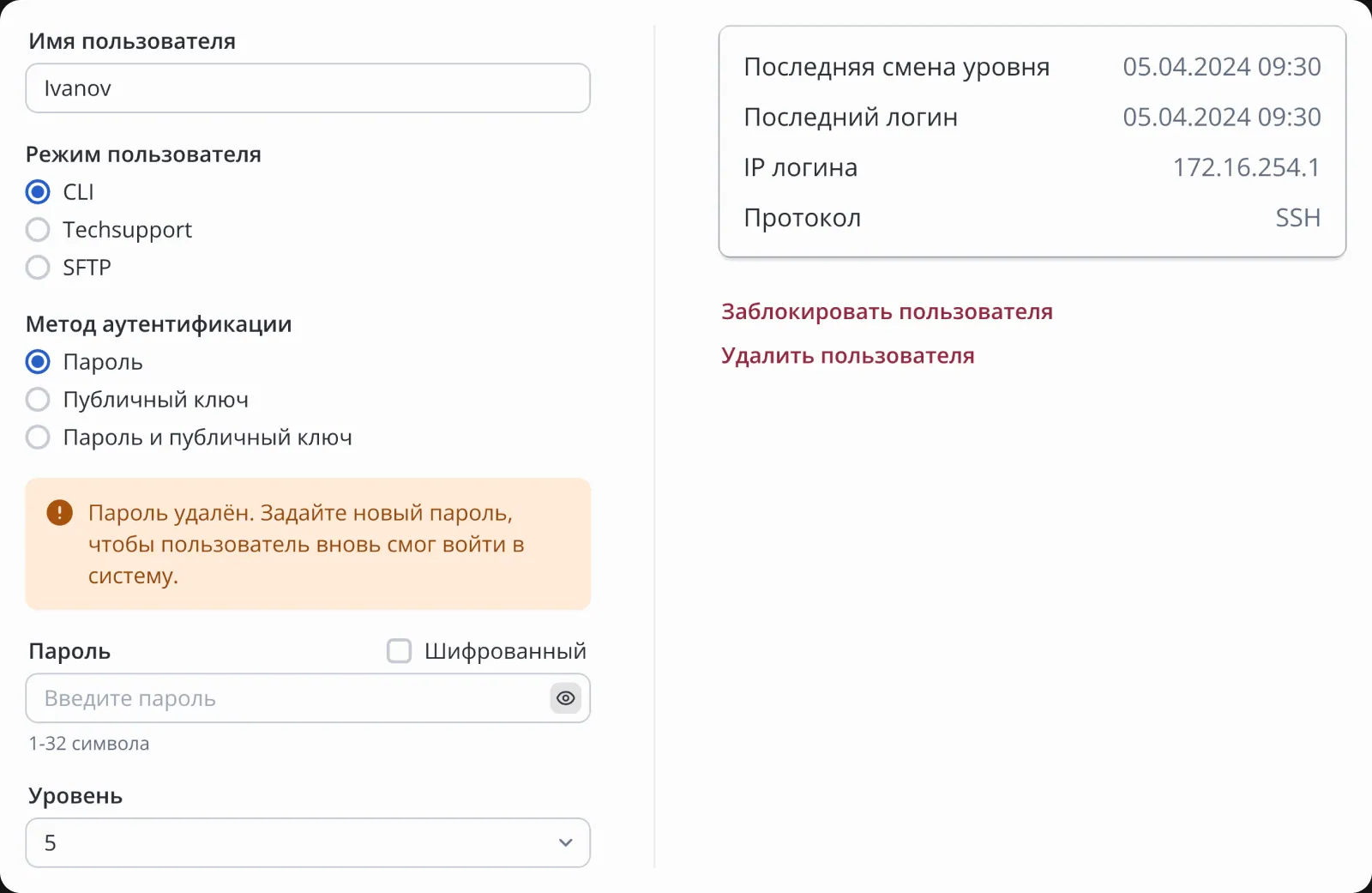
Account settings depend on the chosen authentication method, presence of password, and SSH key. Changing one parameter could make others mandatory, unavailable, or cause conflicts. So I designed a form that changes based on the scenario and shows restrictions upfront.
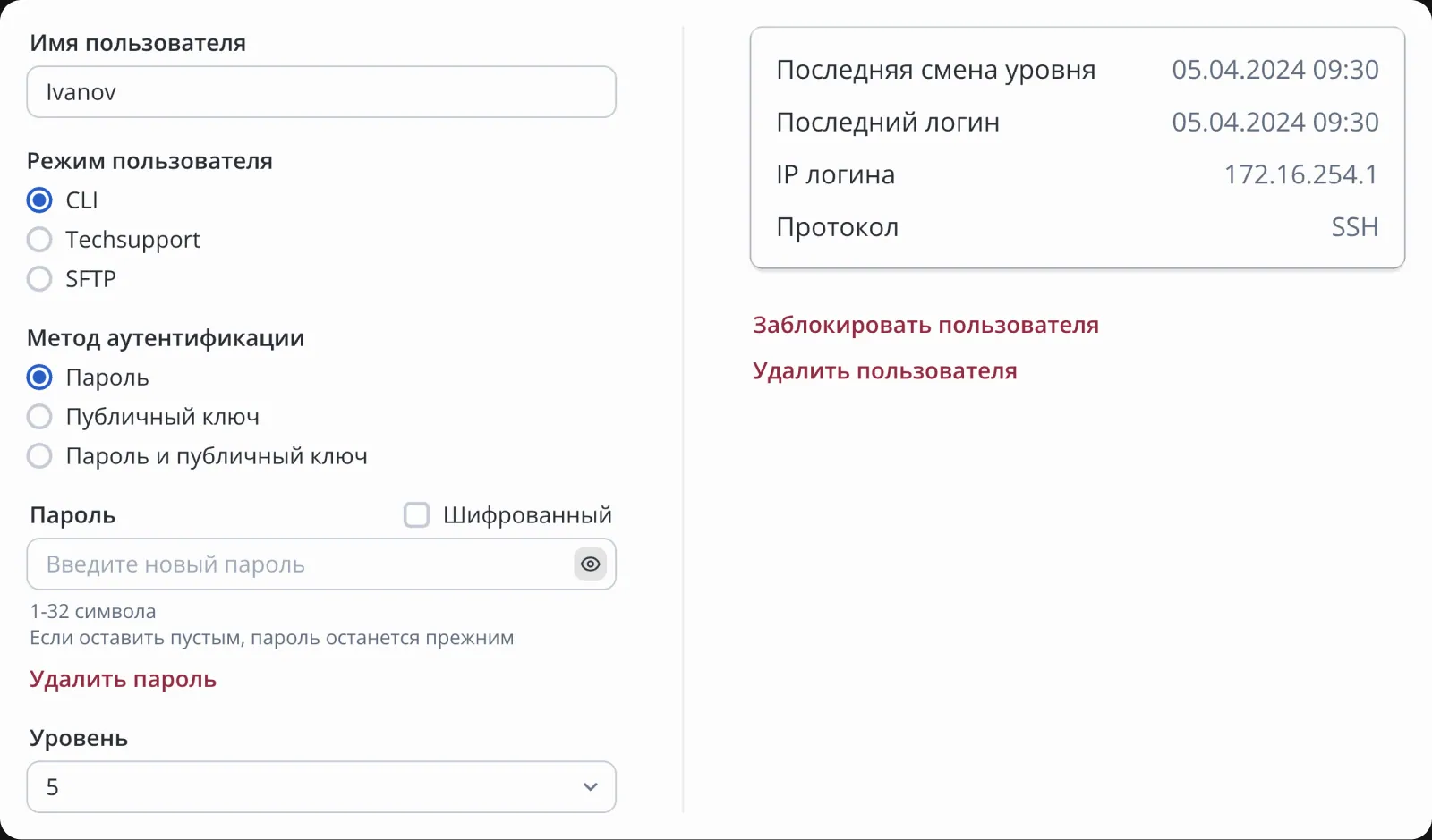
For the user management section, I developed about 20 scenarios related to combinations of authentication methods, password status, SSH keys, and access levels. Below are examples of how the interface changes depending on configuration.
Authentication method — password
Authentication method — public key
Authentication method — password and public key
Password removed / authentication method — password and public key
Password removed / authentication method — password
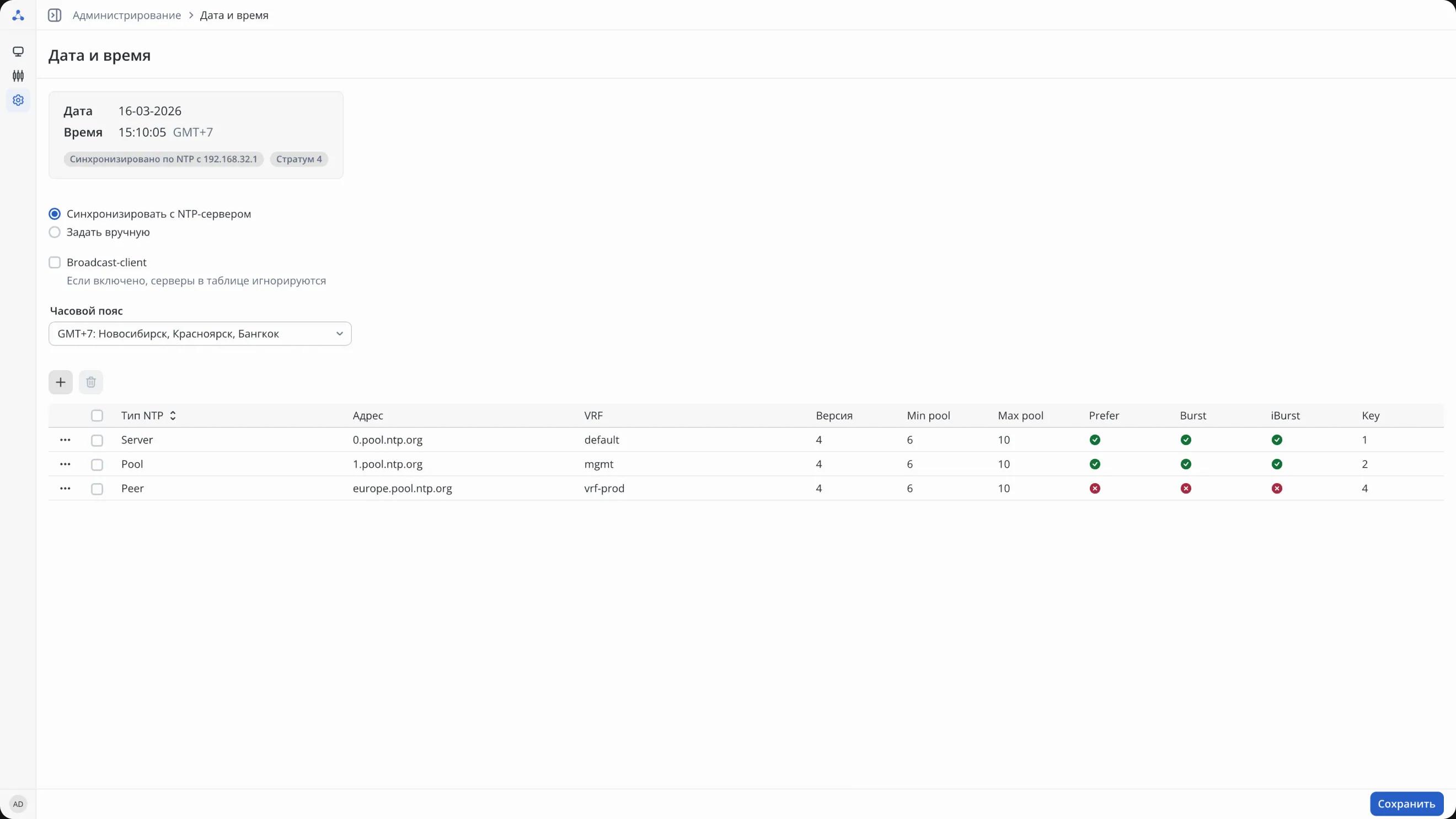
Time configuration
Task: manage time synchronization via NTP.
Server table
Manage time sources and their parameters.
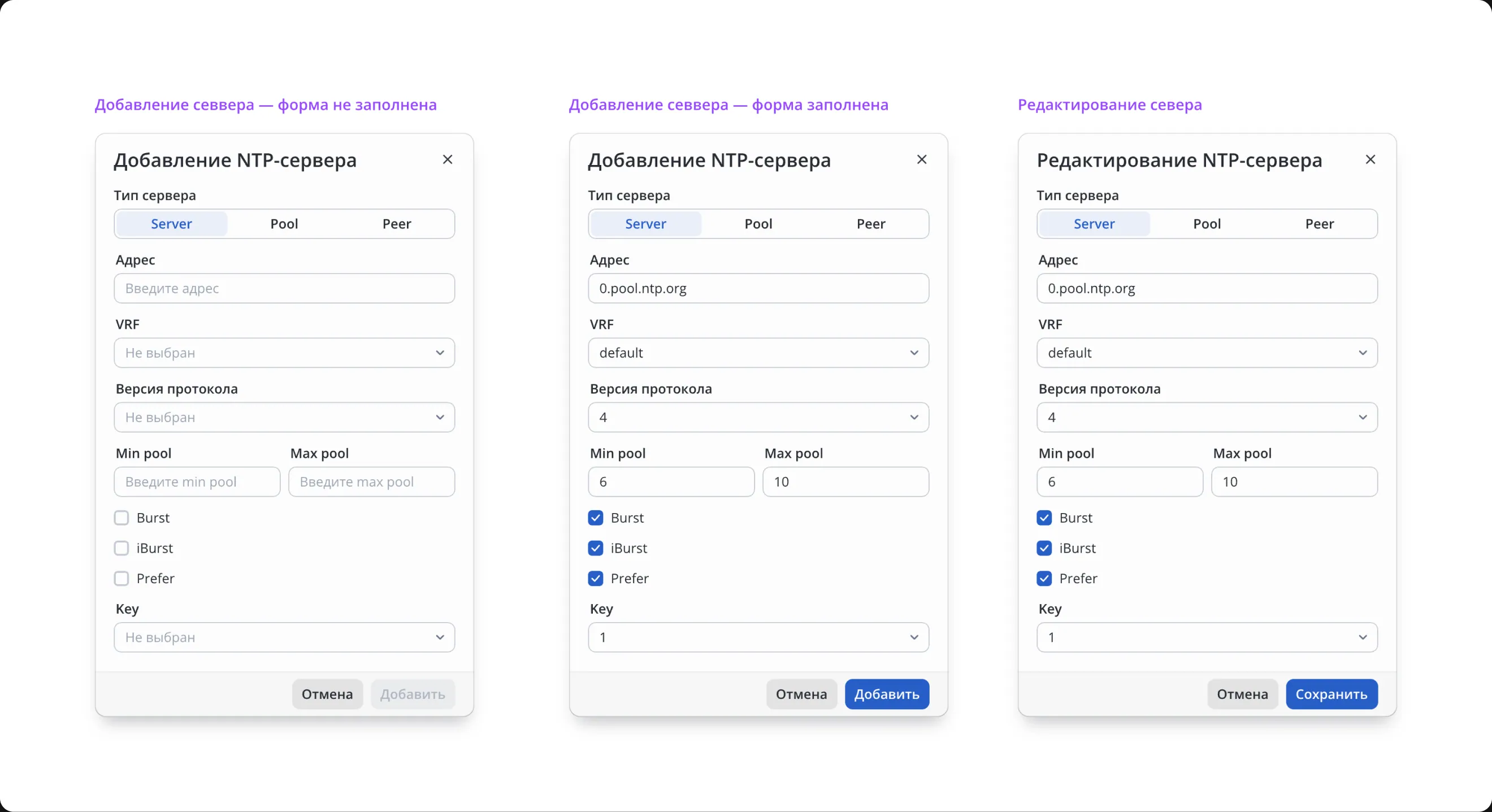
Add and edit
Different types of NTP sources require different configuration parameters. Instead of one overloaded form, I made the interface dependent on the selected type: engineers see only parameters relevant to the current scenario.
Result
Designed interfaces for configuring, monitoring, and managing the service router, preserving the familiar logic for network engineers. The project involved complex configuration scenarios, parameter dependencies, and various interface states for managing physical interfaces, users, and time synchronization.
Eltex
Service router management interfaces.
Telecom
B2B
Web
Company
Eltex
Role
Product Designer
A service router is a product for configuring, monitoring, and managing network equipment.
The main users of the system were network engineers.
My task was to transform complex technical configurations and engineering workflows into clear graphical interfaces.
Main challenge of the project
The project required working with a complex domain: a large number of parameters, interconnected settings, and high information density. One of the key tasks was to preserve the familiar logic for network engineers while presenting it in a convenient and understandable graphical interface.
Constraints
The project started before I joined. I continued product development by designing new sections and scenarios from scratch while adhering to the established interface principles and existing system constraints.
Corporate design system
Interfaces were built on the corporate design system Protocol UI. The system is based on design tokens and includes a component library, storybook, and guidelines for interface pattern usage.
Physical interface management
Task: provide engineers with quick access to configuration, monitoring, and diagnostics of interfaces.
Interface list
Engineers need to simultaneously monitor many physical and nested interfaces and quickly identify problem states. Therefore, the section is based on a table with filtering, visual statuses, and support for interface hierarchy.
Interface configuration
Interface configuration includes many related parameters. Instead of spreading settings across multiple screens, I combined them into a single form so engineers can configure the interface step-by-step without unnecessary navigation.
Monitoring and diagnostics
For diagnostics, engineers need to see interface status, technical metrics, and load dynamics in one place. So I combined operational data, statuses, and charts on a single screen to allow main checks without switching to CLI.
User management
Task: manage device access and configure authentication methods.
User list
To manage access, engineers need to quickly see account status, access level, and authentication method. Therefore, key parameters and statuses were placed directly in the table.
User card
Account settings depend on the chosen authentication method, presence of password, and SSH key. Changing one parameter could make others mandatory, unavailable, or cause conflicts. So I designed a form that changes based on the scenario and shows restrictions upfront.
For the user management section, I developed about 20 scenarios related to combinations of authentication methods, password status, SSH keys, and access levels. Below are examples of how the interface changes depending on configuration.
Authentication method — password
Authentication method — public key
Authentication method — password and public key
Password removed / authentication method — password and public key
Password removed / authentication method — password
Time configuration
Task: manage time synchronization via NTP.
Server table
Manage time sources and their parameters.
Add and edit
Different types of NTP sources require different configuration parameters. Instead of one overloaded form, I made the interface dependent on the selected type: engineers see only parameters relevant to the current scenario.
Result
Designed interfaces for configuring, monitoring, and managing the service router, preserving the familiar logic for network engineers. The project involved complex configuration scenarios, parameter dependencies, and various interface states for managing physical interfaces, users, and time synchronization.
Eltex
Service router management interfaces.
Telecom
B2B
Web
Company
Eltex
Role
Product Designer
A service router is a product for configuring, monitoring, and managing network equipment.
The main users of the system were network engineers.
My task was to transform complex technical configurations and engineering workflows into clear graphical interfaces.
Main challenge of the project
The project required working with a complex domain: a large number of parameters, interconnected settings, and high information density. One of the key tasks was to preserve the familiar logic for network engineers while presenting it in a convenient and understandable graphical interface.
Constraints
The project started before I joined. I continued product development by designing new sections and scenarios from scratch while adhering to the established interface principles and existing system constraints.
Corporate design system
Interfaces were built on the corporate design system Protocol UI. The system is based on design tokens and includes a component library, storybook, and guidelines for interface pattern usage.
Physical interface management
Task: provide engineers with quick access to configuration, monitoring, and diagnostics of interfaces.
Interface list
Engineers need to simultaneously monitor many physical and nested interfaces and quickly identify problem states. Therefore, the section is based on a table with filtering, visual statuses, and support for interface hierarchy.
Interface configuration
Interface configuration includes many related parameters. Instead of spreading settings across multiple screens, I combined them into a single form so engineers can configure the interface step-by-step without unnecessary navigation.
Monitoring and diagnostics
For diagnostics, engineers need to see interface status, technical metrics, and load dynamics in one place. So I combined operational data, statuses, and charts on a single screen to allow main checks without switching to CLI.
User management
Task: manage device access and configure authentication methods.
User list
To manage access, engineers need to quickly see account status, access level, and authentication method. Therefore, key parameters and statuses were placed directly in the table.
User card
Account settings depend on the chosen authentication method, presence of password, and SSH key. Changing one parameter could make others mandatory, unavailable, or cause conflicts. So I designed a form that changes based on the scenario and shows restrictions upfront.
For the user management section, I developed about 20 scenarios related to combinations of authentication methods, password status, SSH keys, and access levels. Below are examples of how the interface changes depending on configuration.
Authentication method — password
Authentication method — public key
Authentication method — password and public key
Password removed / authentication method — password and public key
Password removed / authentication method — password
Time configuration
Task: manage time synchronization via NTP.
Server table
Manage time sources and their parameters.
Add and edit
Different types of NTP sources require different configuration parameters. Instead of one overloaded form, I made the interface dependent on the selected type: engineers see only parameters relevant to the current scenario.
Result
Designed interfaces for configuring, monitoring, and managing the service router, preserving the familiar logic for network engineers. The project involved complex configuration scenarios, parameter dependencies, and various interface states for managing physical interfaces, users, and time synchronization.