I Have Ticket
Website design for live streaming concerts.
Entertainment
Streaming
B2C
Company
Snocko Technologies Co.Ltd
Role
Product Designer
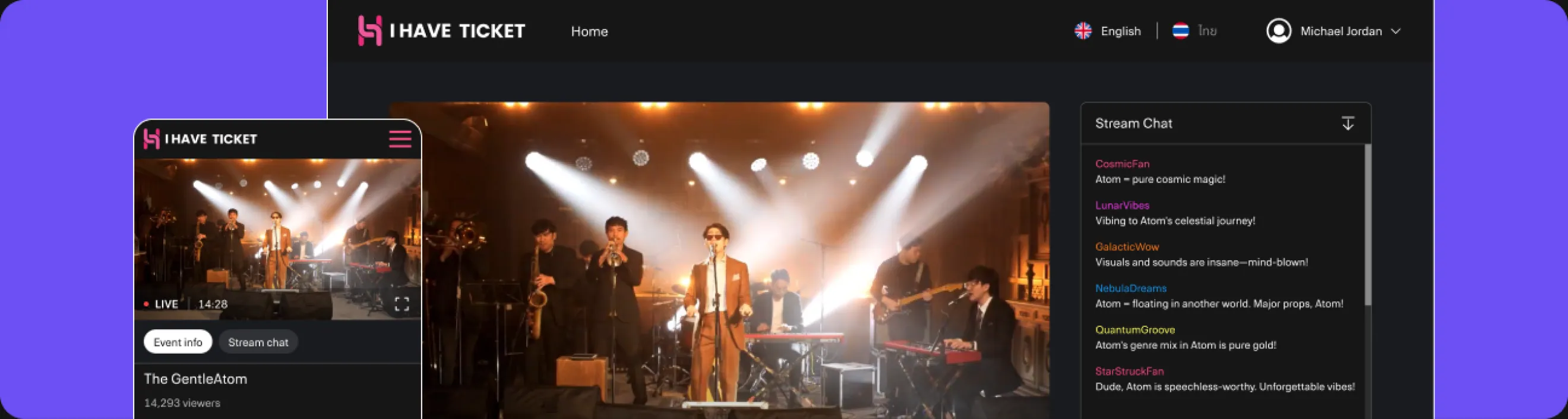
I Have Ticket is a platform for purchasing tickets and watching online concerts of local performers. Concerts took place in a professional studio without offline audiences and were broadcast live.
Watch the highlights from some concerts — it was amazing!
Results and Metrics
- Ticket purchase conversion rate was 8%.
- Retention Rate was 30% — this many users bought tickets for more than one concert.
- Customer Satisfaction was 85%.
- Bounce Rate was only about 35%.
Product Goal
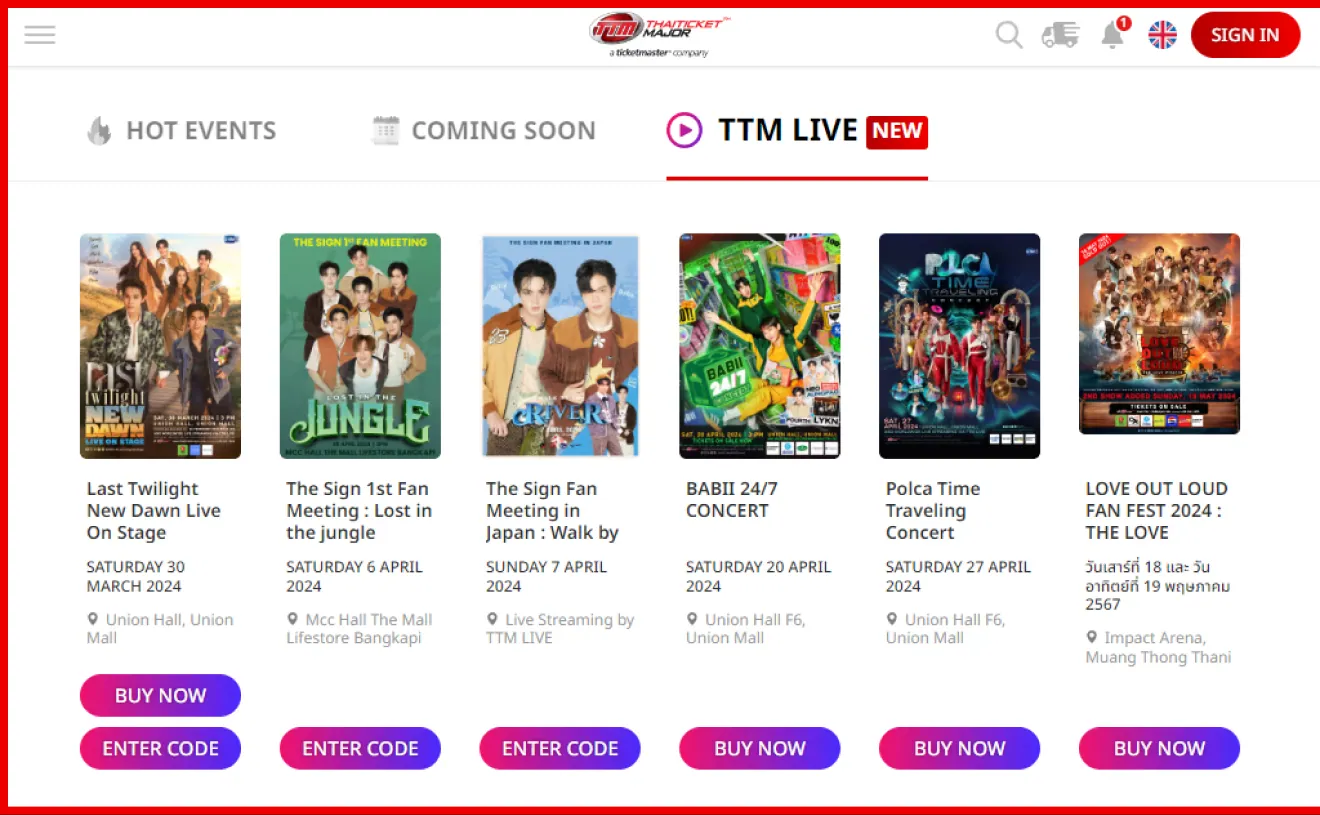
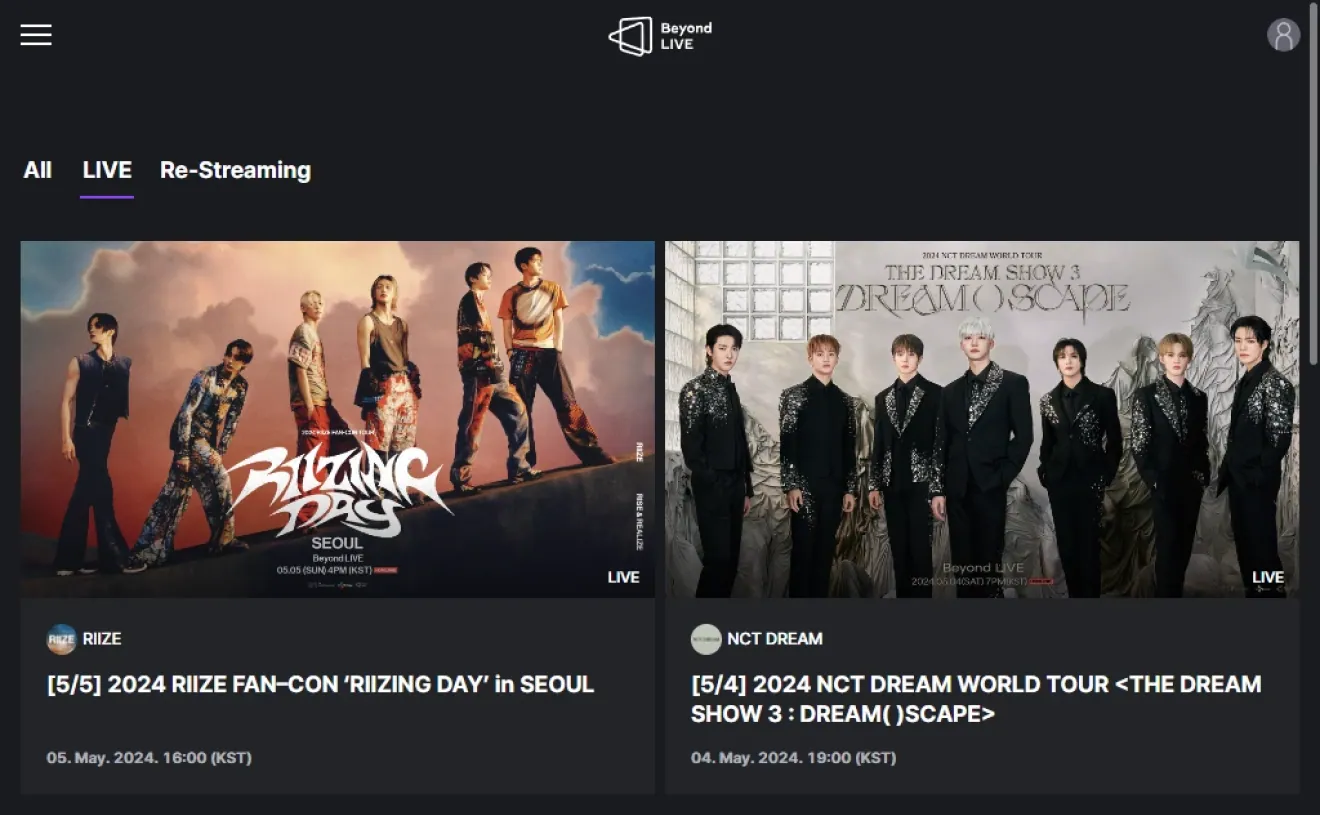
There were already services for online concert streaming in the Thai market, including Thai Ticket Major, and Beyond LIVE was popular among the K-pop audience. The company decided to launch a local product with a different concept — studio concerts without offline audiences, created specifically for online streaming.
What I Did
I was responsible for almost the entire product design: from audience research and forming product decisions to UX/UI, testing, and handing over designs to development. I delegated some usability testing to a junior designer and supervised their work.
Survey
To better understand the audience, I conducted a survey among about 2,000 respondents aged 18 to 35.
Key Insights
70%
More interested in the artist lineup than the ticket price.
45%
May refuse to buy tickets online if the site asks for too much personal information.
70%
Would prefer to pay for tickets by scanning a QR code with a banking app.
70%
Would rewatch concert recordings.
Competitors
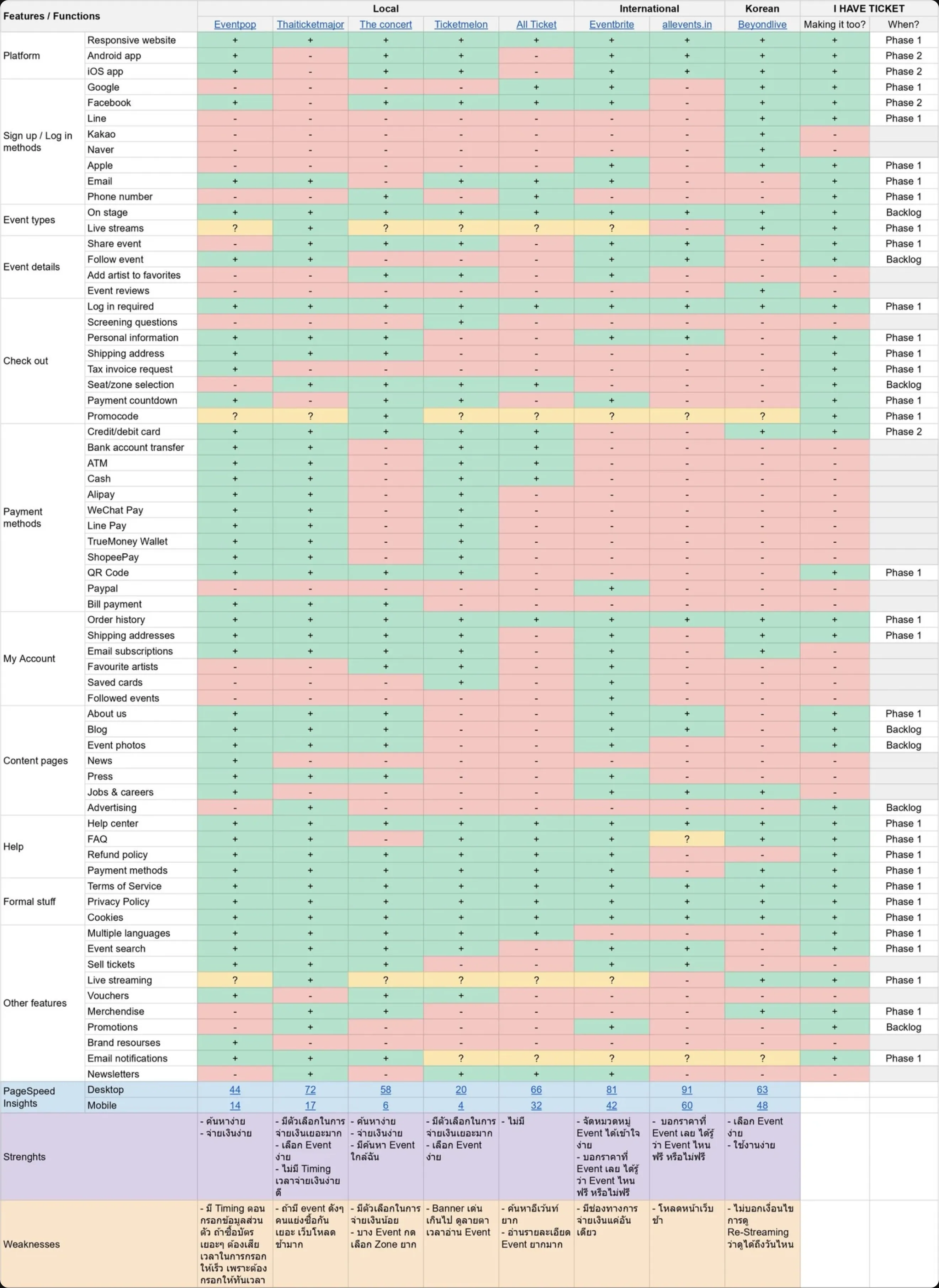
After the survey, I studied the features of direct and indirect competitors to determine which functions to implement in our product and how to improve them.
Open in Google Sheets
Product Decisions
Based on the data obtained, I formed and prioritised the following product decisions:
Simplify registration — Reduce the number of required fields to lower the dropout rate during registration.
Make artists the main focus — Primarily show performers and the lineup, as they influence interest in the concert more than the ticket price.
Add concert recordings — Allow buying tickets and watching concerts after the live broadcast ends.
Add VIP tickets with merchandise — Create an additional ticket format for the most interested audience.
Add countdown to the concert — Show time until the broadcast starts on the ticket page, encouraging purchase before the start.
Structure
Based on research and chosen decisions, I formed the product structure and moved on to designing key scenarios.
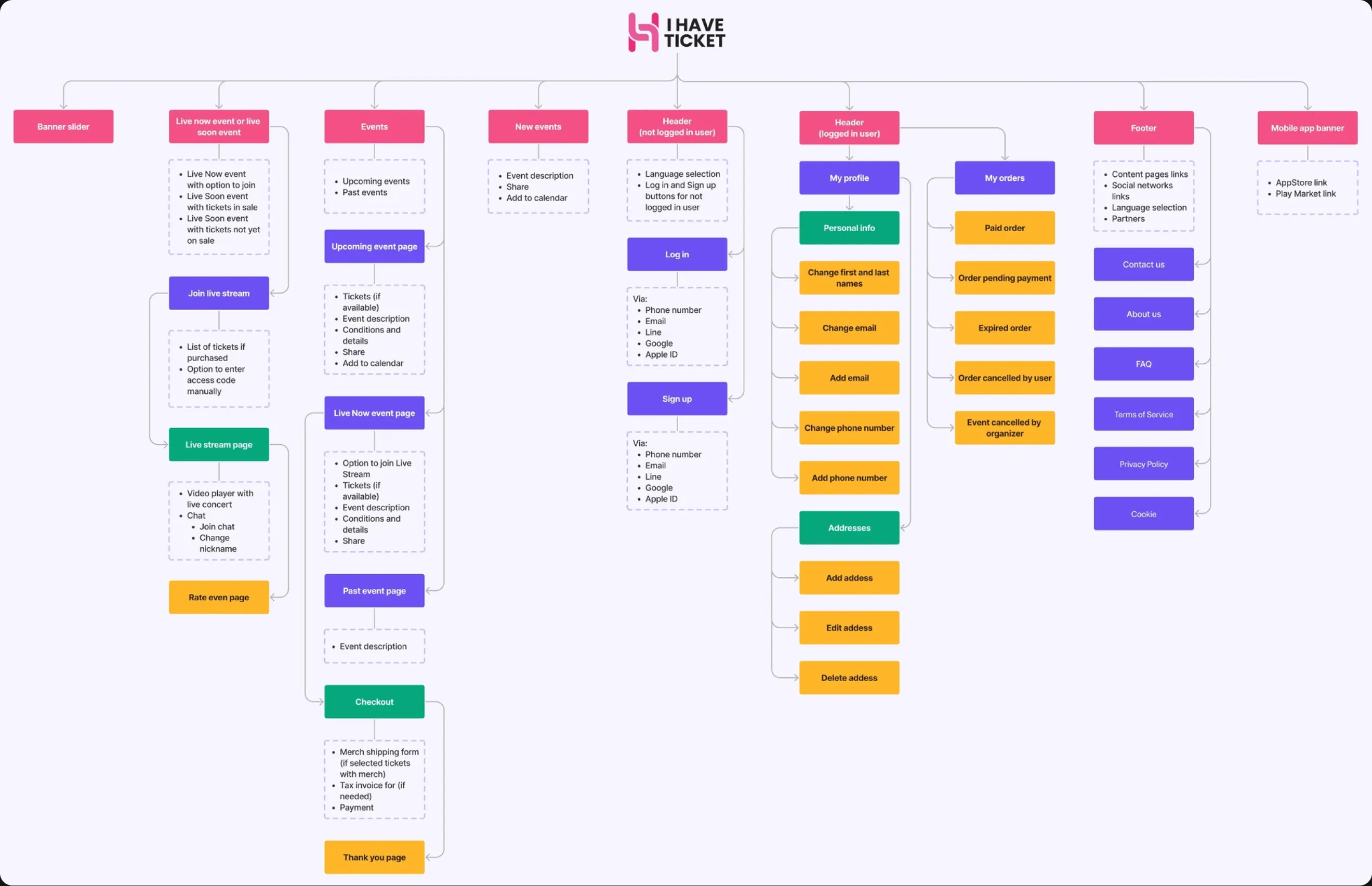
View in FigJam
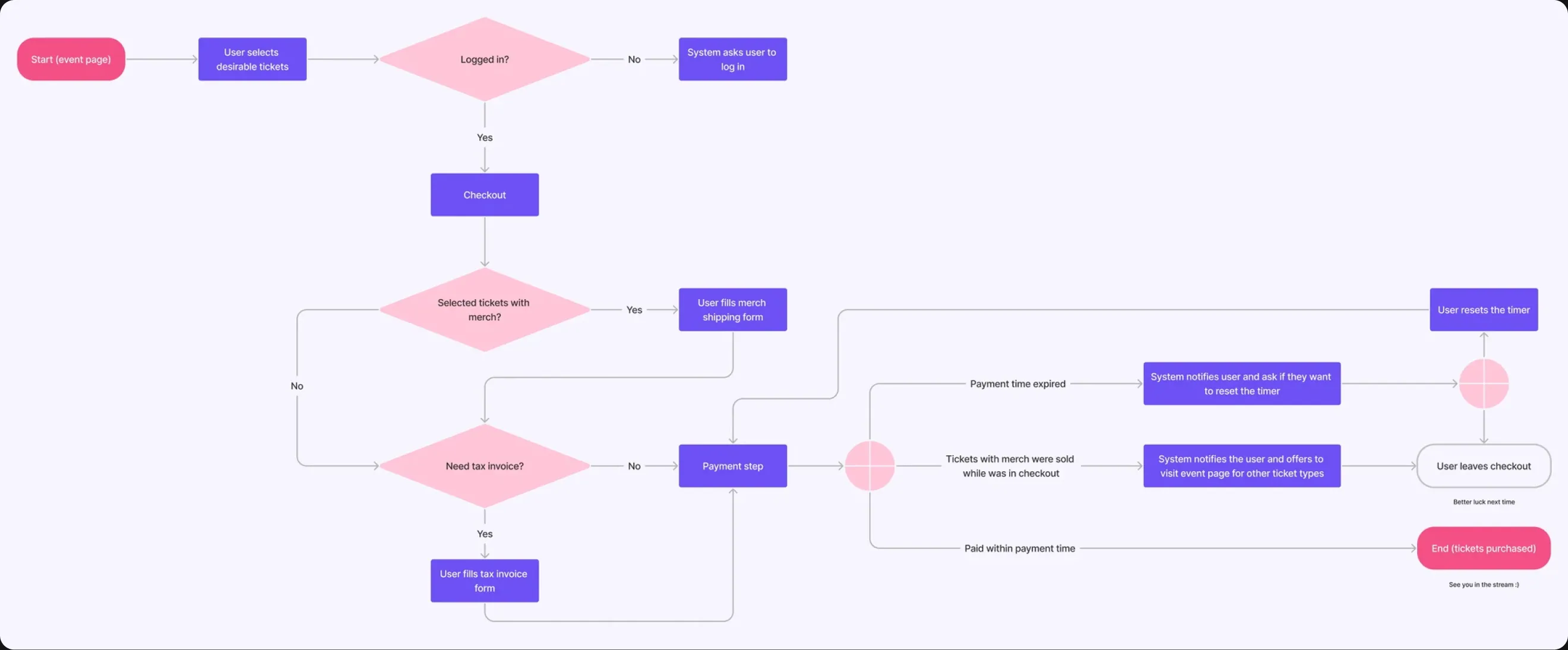
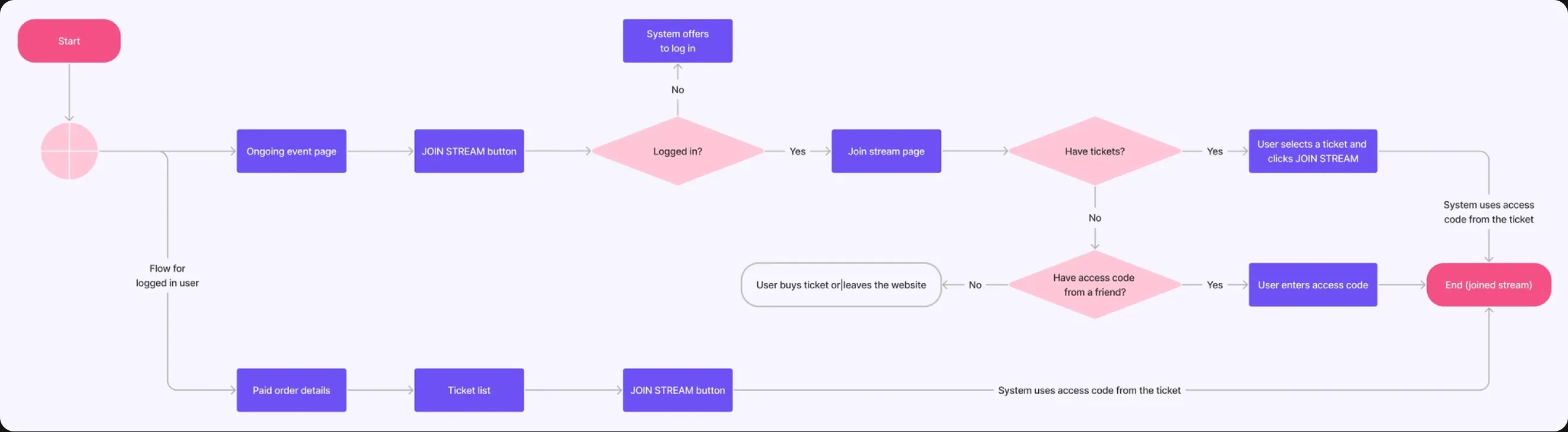
Flow
Based on research and chosen decisions, I formed the product structure and moved on to designing key scenarios.
Registration

Ticket Purchase
Stream Access
View flow in FigJam
Usability Testing
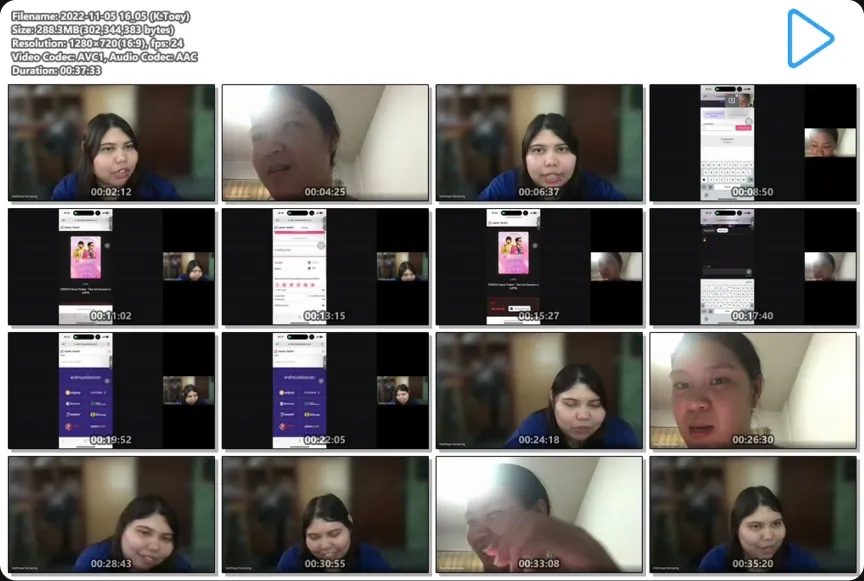
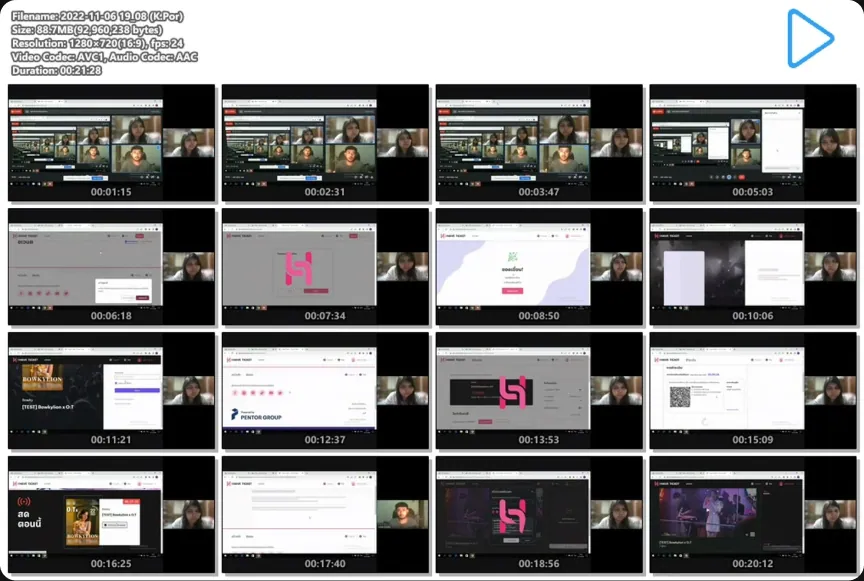
After developing the interface, I wanted to check how well our solutions worked with real users, so before launching the site we conducted online moderated usability testing. The testing was conducted by a junior designer under my supervision. This allowed us to directly observe user behaviour and identify interface issues.
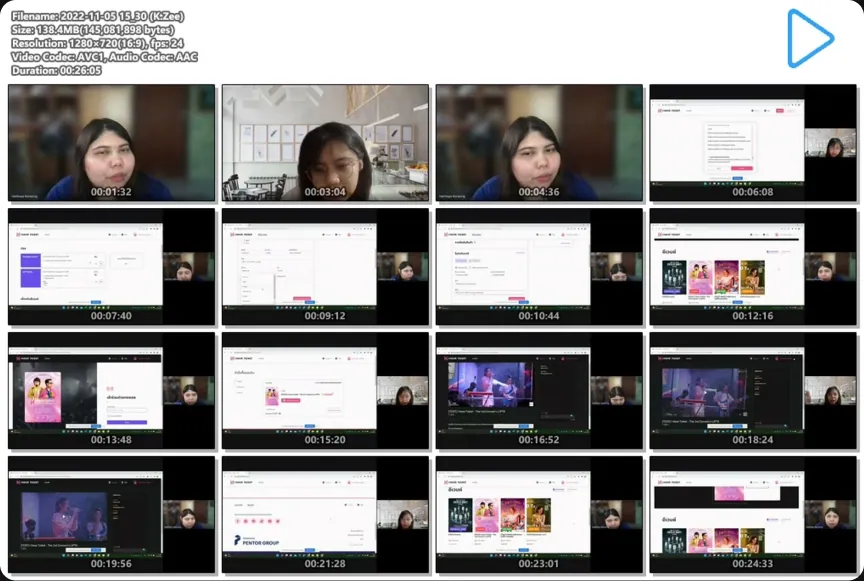
Respondents
- 9 respondents
- Aged 18 to 30
- Experienced in online shopping
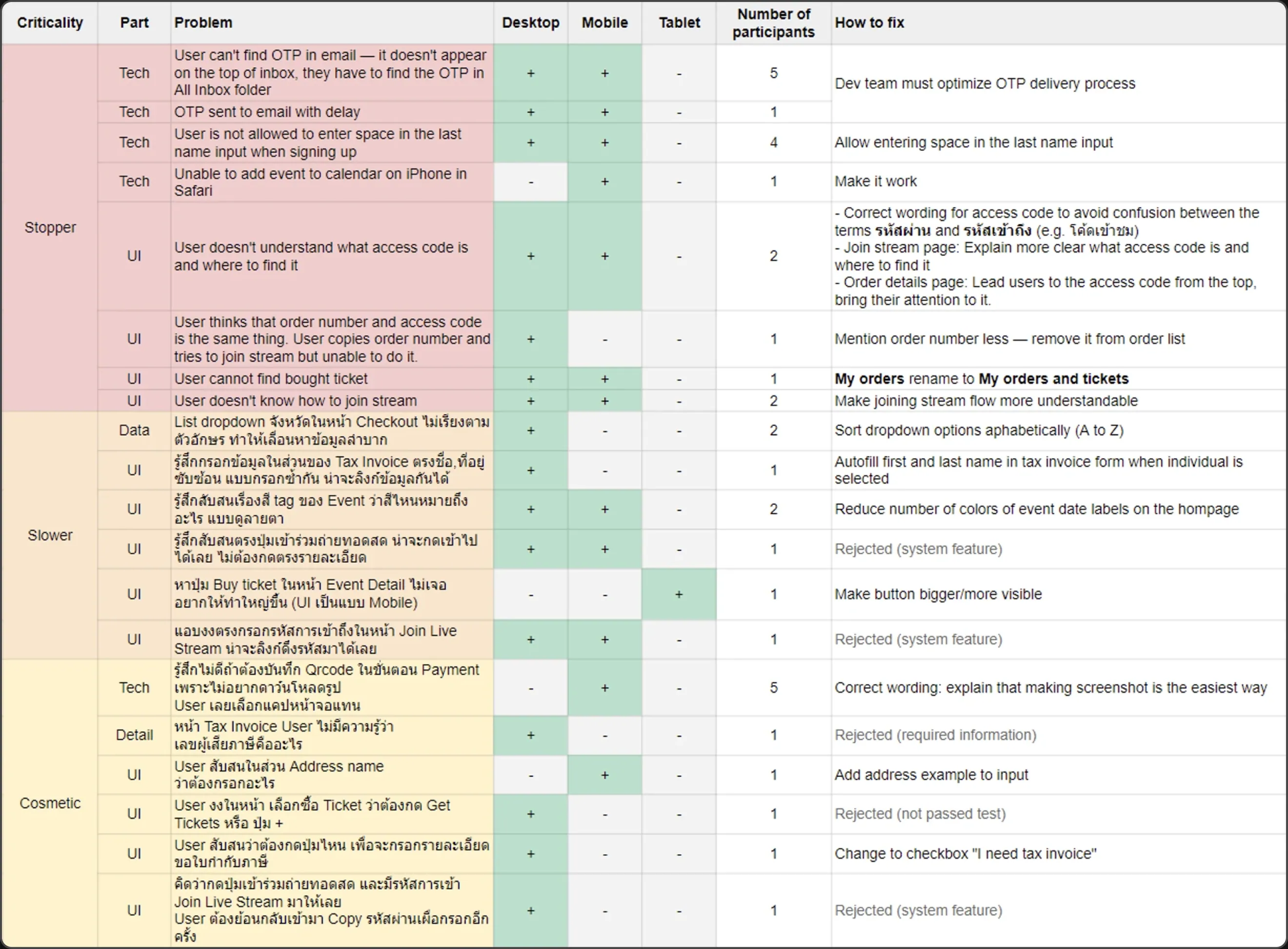
Identified Issues
9 blockers
Critical issues that could cause users to leave the site before completing the scenario.
6 slowers
Non-critical issues that nevertheless slow users down during the scenario.
6 cosmetic issues
Minor visual issues that do not affect the scenario but require attention to improve overall UX.
Open in Google Sheets
Based on the testing results, the team and I found solutions for the identified problems and refined the interface, improving user experience and technical performance of the site.
Final UI
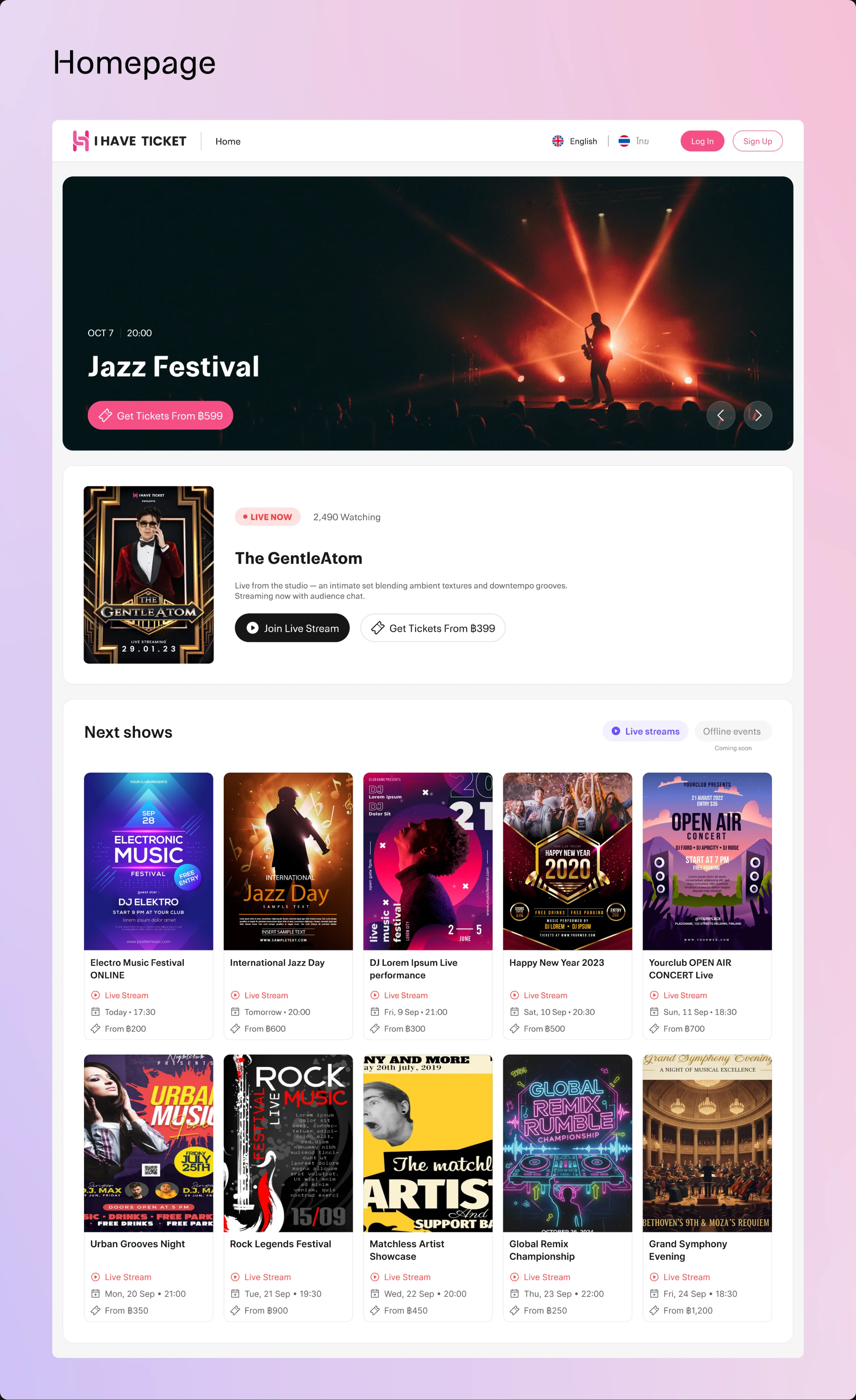
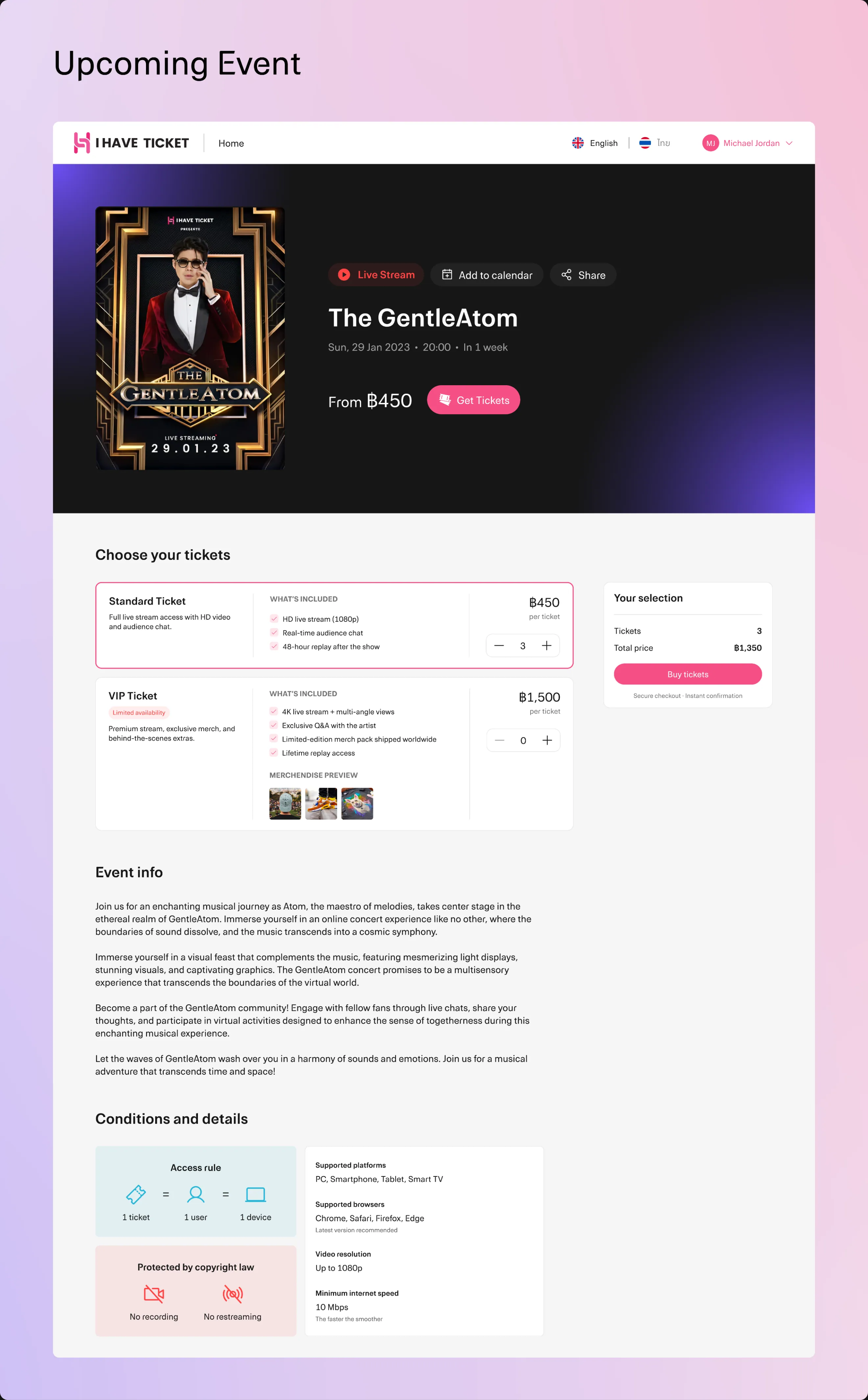
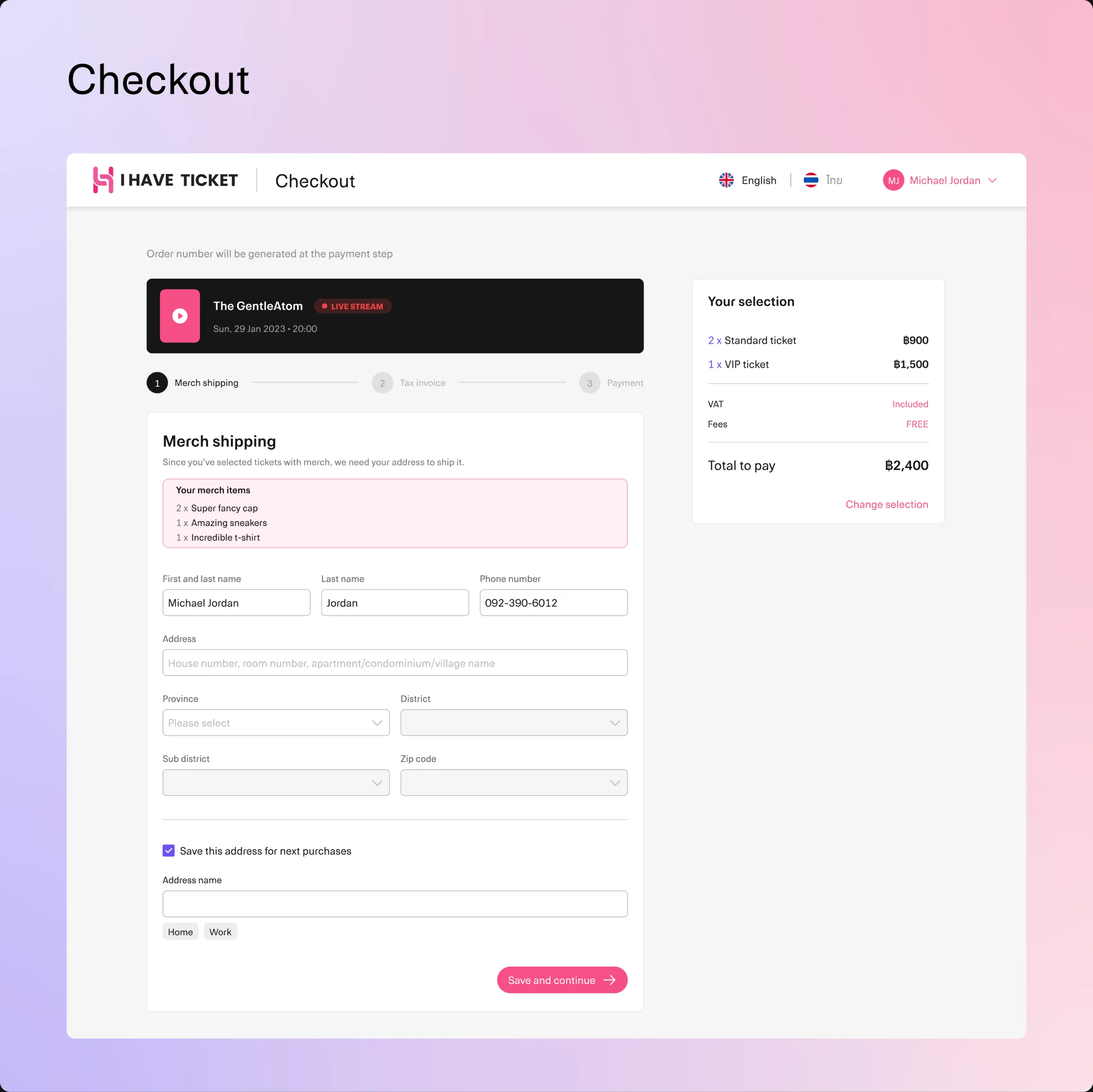
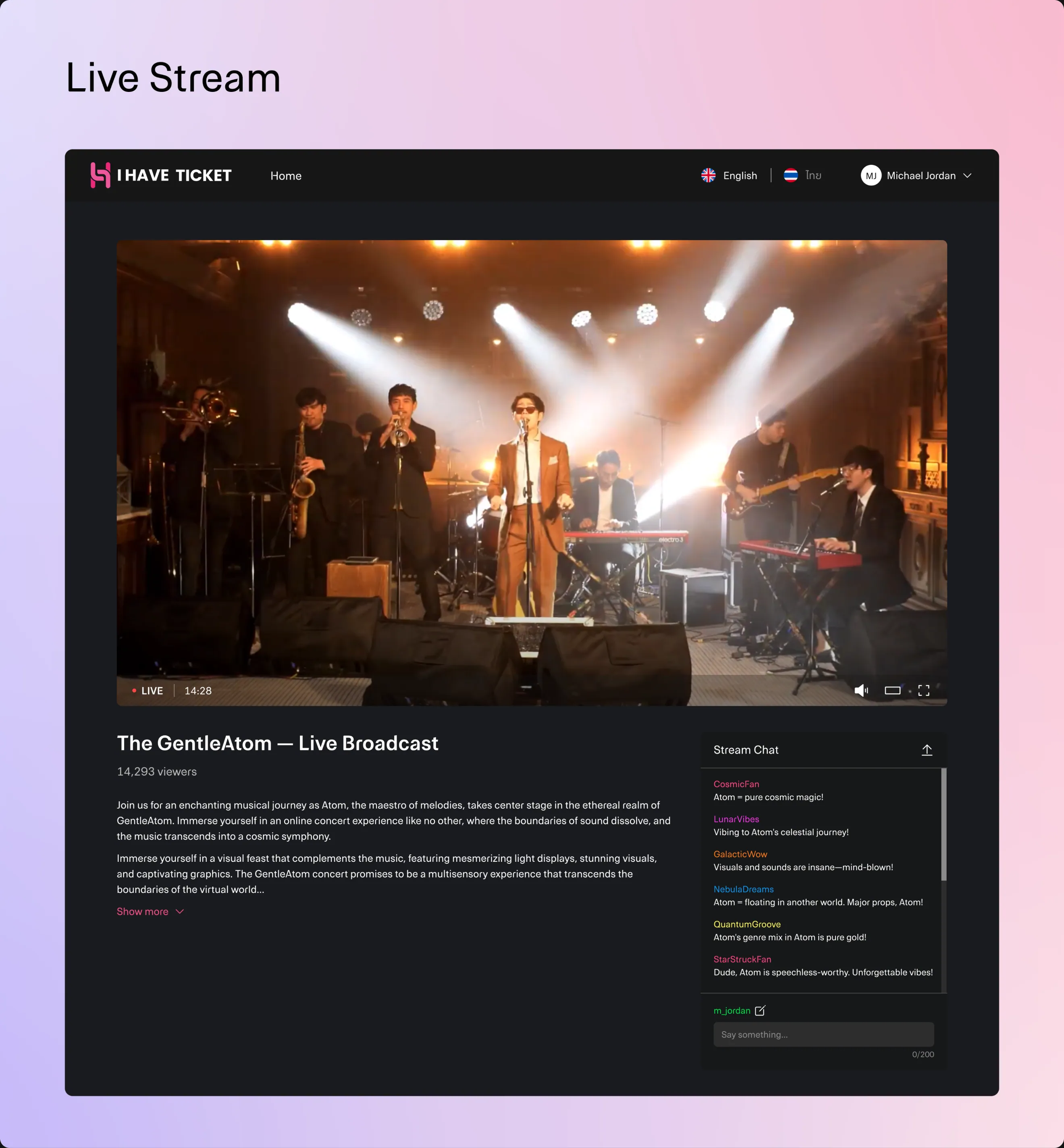
After testing, I fixed critical issues in key scenarios and prepared the final UI for desktop, tablet, and mobile.

360px for mobile

1024px for tablet

1440px for desktop
Current Status
Before leaving the company, the team and I started working on the design for purchasing tickets for Onstage events (offline concerts). I managed to participate in developing the flow and part of the UI, particularly the event and checkout pages. The company is currently continuing work on the product.
I Have Ticket
Website design for live streaming concerts.
Entertainment
Streaming
B2C
Company
Snocko Technologies Co.Ltd
Role
Product Designer
I Have Ticket is a platform for purchasing tickets and watching online concerts of local performers. Concerts took place in a professional studio without offline audiences and were broadcast live.
Watch the highlights from some concerts — it was amazing!
Results and Metrics
- Ticket purchase conversion rate was 8%.
- Retention Rate was 30% — this many users bought tickets for more than one concert.
- Customer Satisfaction was 85%.
- Bounce Rate was only about 35%.
Product Goal
There were already services for online concert streaming in the Thai market, including Thai Ticket Major, and Beyond LIVE was popular among the K-pop audience. The company decided to launch a local product with a different concept — studio concerts without offline audiences, created specifically for online streaming.
What I Did
I was responsible for almost the entire product design: from audience research and forming product decisions to UX/UI, testing, and handing over designs to development. I delegated some usability testing to a junior designer and supervised their work.
Survey
To better understand the audience, I conducted a survey among about 2,000 respondents aged 18 to 35.
Key Insights
70%
More interested in the artist lineup than the ticket price.
45%
May refuse to buy tickets online if the site asks for too much personal information.
70%
Would prefer to pay for tickets by scanning a QR code with a banking app.
70%
Would rewatch concert recordings.
Competitors
After the survey, I studied the features of direct and indirect competitors to determine which functions to implement in our product and how to improve them.
Open in Google Sheets
Product Decisions
Based on the data obtained, I formed and prioritised the following product decisions:
Simplify registration — Reduce the number of required fields to lower the dropout rate during registration.
Make artists the main focus — Primarily show performers and the lineup, as they influence interest in the concert more than the ticket price.
Add concert recordings — Allow buying tickets and watching concerts after the live broadcast ends.
Add VIP tickets with merchandise — Create an additional ticket format for the most interested audience.
Add countdown to the concert — Show time until the broadcast starts on the ticket page, encouraging purchase before the start.
Structure
Based on research and chosen decisions, I formed the product structure and moved on to designing key scenarios.
View in FigJam
Flow
Based on research and chosen decisions, I formed the product structure and moved on to designing key scenarios.
Registration
Ticket Purchase
Stream Access
View flow in FigJam
Usability Testing
After developing the interface, I wanted to check how well our solutions worked with real users, so before launching the site we conducted online moderated usability testing. The testing was conducted by a junior designer under my supervision. This allowed us to directly observe user behaviour and identify interface issues.
Respondents
- 9 respondents
- Aged 18 to 30
- Experienced in online shopping
Identified Issues
9 blockers
Critical issues that could cause users to leave the site before completing the scenario.
6 slowers
Non-critical issues that nevertheless slow users down during the scenario.
6 cosmetic issues
Minor visual issues that do not affect the scenario but require attention to improve overall UX.
Open in Google Sheets
Based on the testing results, the team and I found solutions for the identified problems and refined the interface, improving user experience and technical performance of the site.
Final UI
After testing, I fixed critical issues in key scenarios and prepared the final UI for desktop, tablet, and mobile.
360px for mobile
1024px for tablet
1440px for desktop
Current Status
Before leaving the company, the team and I started working on the design for purchasing tickets for Onstage events (offline concerts). I managed to participate in developing the flow and part of the UI, particularly the event and checkout pages. The company is currently continuing work on the product.
I Have Ticket
Website design for live streaming concerts.
Entertainment
Streaming
B2C
Company
Snocko Technologies Co.Ltd
Role
Product Designer
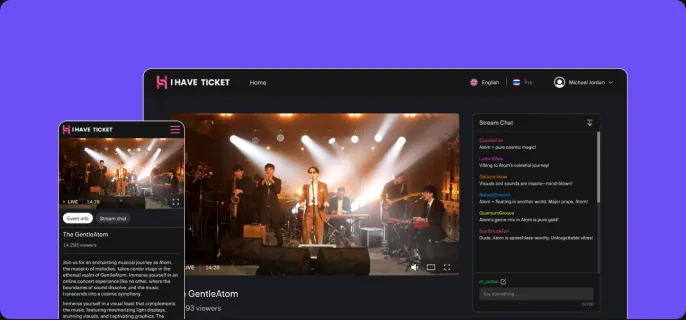
I Have Ticket is a platform for purchasing tickets and watching online concerts of local performers. Concerts took place in a professional studio without offline audiences and were broadcast live.
Watch the highlights from some concerts — it was amazing!
Results and Metrics
- Ticket purchase conversion rate was 8%.
- Retention Rate was 30% — this many users bought tickets for more than one concert.
- Customer Satisfaction was 85%.
- Bounce Rate was only about 35%.
Product Goal
There were already services for online concert streaming in the Thai market, including Thai Ticket Major, and Beyond LIVE was popular among the K-pop audience. The company decided to launch a local product with a different concept — studio concerts without offline audiences, created specifically for online streaming.
What I Did
I was responsible for almost the entire product design: from audience research and forming product decisions to UX/UI, testing, and handing over designs to development. I delegated some usability testing to a junior designer and supervised their work.
Survey
To better understand the audience, I conducted a survey among about 2,000 respondents aged 18 to 35.
Key Insights
70%
More interested in the artist lineup than the ticket price.
45%
May refuse to buy tickets online if the site asks for too much personal information.
70%
Would prefer to pay for tickets by scanning a QR code with a banking app.
70%
Would rewatch concert recordings.
Competitors
After the survey, I studied the features of direct and indirect competitors to determine which functions to implement in our product and how to improve them.
Open in Google Sheets
Product Decisions
Based on the data obtained, I formed and prioritised the following product decisions:
Simplify registration — Reduce the number of required fields to lower the dropout rate during registration.
Make artists the main focus — Primarily show performers and the lineup, as they influence interest in the concert more than the ticket price.
Add concert recordings — Allow buying tickets and watching concerts after the live broadcast ends.
Add VIP tickets with merchandise — Create an additional ticket format for the most interested audience.
Add countdown to the concert — Show time until the broadcast starts on the ticket page, encouraging purchase before the start.
Structure
Based on research and chosen decisions, I formed the product structure and moved on to designing key scenarios.
View in FigJam
Flow
Based on research and chosen decisions, I formed the product structure and moved on to designing key scenarios.
Registration
Ticket Purchase
Stream Access
View flow in FigJam
Usability Testing
After developing the interface, I wanted to check how well our solutions worked with real users, so before launching the site we conducted online moderated usability testing. The testing was conducted by a junior designer under my supervision. This allowed us to directly observe user behaviour and identify interface issues.
Respondents
- 9 respondents
- Aged 18 to 30
- Experienced in online shopping
Identified Issues
9 blockers
Critical issues that could cause users to leave the site before completing the scenario.
6 slowers
Non-critical issues that nevertheless slow users down during the scenario.
6 cosmetic issues
Minor visual issues that do not affect the scenario but require attention to improve overall UX.
Open in Google Sheets
Based on the testing results, the team and I found solutions for the identified problems and refined the interface, improving user experience and technical performance of the site.
Final UI
After testing, I fixed critical issues in key scenarios and prepared the final UI for desktop, tablet, and mobile.
360px for mobile
1024px for tablet
1440px for desktop
Current Status
Before leaving the company, the team and I started working on the design for purchasing tickets for Onstage events (offline concerts). I managed to participate in developing the flow and part of the UI, particularly the event and checkout pages. The company is currently continuing work on the product.